Developer Dashboard
The Developer Dashboard is a web application for managing Scry projects, API keys, and viewing build history.
Features
- Project Management - Create, view, and manage projects
- Organisations - Share projects across a team, with members and invites
- API Key Management - Generate and revoke project-scoped keys
- Build History - View deployment history and status
- Design Sync - Figma connection, linked screens, and imported designs
- Visual Review - Compare a Figma layer with its story, and raise issues on the difference, with an Evidence strip to inspect a finding pixel by pixel
- Support references - Failed actions show a Ref you can quote to us, and each diff run keeps one
- Private Previews - Mint short-lived tokens so private stories render in the Figma plugin
- GitHub Integration - Import projects from GitHub repositories
- User Authentication - Firebase Auth: Google, GitHub, or email and password
Support references
When an action in the dashboard fails, the red error message keeps its title and description and adds a line Ref: with the request id, plus a Copy reference button. After you click it, the button shows Copied for two seconds. On a narrow screen the id wraps onto its own line rather than being cut off.
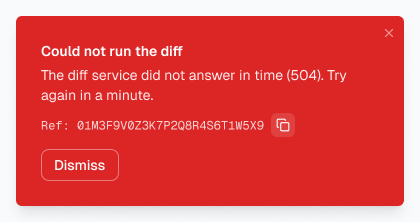
There's no Ref line when the request never reached Scry, for example when you're offline.
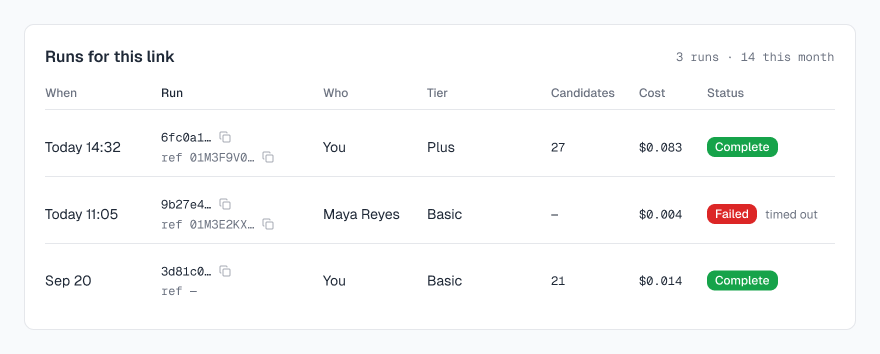
Diff runs keep their reference too. The Runs for this link card has a Run column after When: the short run id (6fc0a1…) with a copy button, and under it ref with the first characters of the request id that started the run. Hover for the full run id and reference. The copy menu has Copy run id and Copy reference. Runs from before references existed show ref — and only the run id.
A reference is safe to paste into an email or a GitHub issue: it's random and grants no access. What to send us with it, and how the id works across services: Request ids and support references.
Tech Stack
- Framework: Next.js
- Language: TypeScript
- Styling: Tailwind CSS
- UI Components: Radix UI & shadcn/ui
- Backend: Firebase (Auth, Firestore, Storage)
Quick Start
Access the Hosted Dashboard
Visit dashboard.scrymore.com to:
- Sign in with GitHub
- Create a new project
- Generate an API key
- Start deploying!
Self-Hosting
See Setup for self-hosting instructions.
Dashboard Features
Projects Page
View all your projects:
┌─────────────────────────────────────────────────────────┐
│  My Projects                              [New Project] │
├─────────────────────────────────────────────────────────┤
│  ┌──────────────┐  ┌──────────────┐  ┌──────────────┐  │
│  │ Design System│  │ Docs Site    │  │ Component Lib│  │
│  │ 42 builds    │  │ 15 builds    │  │ 8 builds     │  │
│  │ Active       │  │ Active       │  │ Active       │  │
│  └──────────────┘  └──────────────┘  └──────────────┘  │
└─────────────────────────────────────────────────────────┘Project Details
View project information and recent builds:
┌─────────────────────────────────────────────────────────┐
│  Design System                                          │
├─────────────────────────────────────────────────────────┤
│  Project ID: design-system                              │
│  Created: Jan 15, 2024                                  │
│  Total Builds: 42                                       │
│                                                         │
│  Recent Builds                                          │
│  ├── #42 latest    ✓ Active    2 hours ago             │
│  ├── #41 pr-123    ✓ Active    5 hours ago             │
│  └── #40 v1.2.0    ✓ Active    1 day ago               │
│                                                         │
│  [View All Builds]  [Settings]  [API Keys]              │
└─────────────────────────────────────────────────────────┘API Keys Management
Generate and manage API keys:
┌─────────────────────────────────────────────────────────┐
│  API Keys                                [Generate Key] │
├─────────────────────────────────────────────────────────┤
│  Name            Prefix          Last Used    Status    │
│  ────────────────────────────────────────────────────── │
│  CI/CD Key       scry_proj_...   2 hours ago  Active    │
│  Local Dev       scry_proj_...   Never        Active    │
│  Old Key         scry_proj_...   30 days ago  Revoked   │
└─────────────────────────────────────────────────────────┘Authentication Flow
Sign-in goes through Firebase Auth, which supports Google, GitHub and email/password. The dashboard never handles a provider credential itself — Firebase returns an ID token, and the dashboard exchanges it for its own session.
User ──▶ Dashboard ──▶ Firebase Auth ──▶ provider (Google / GitHub / email) ──▶ sessionTwo other credentials exist alongside that session, because not every client is a browser:
| Credential | Prefix | Used by |
|---|---|---|
| Project API key | scry_proj_ | CI, via the upload service |
| Personal access token | scry_pat_ | The CLI and the Figma plugin |
Both are stored as hashes. A project key is scoped to one project; a personal access token acts as the user and is what the Figma plugin's device-code sign-in produces.
Data Model
Projects
interface Project {
  id: string;
  name: string;
  description?: string;
  createdAt: Timestamp;
  createdBy: string;
  ownerId: string;
  settings: {
    defaultVersion: string;
  };
}Builds
interface Build {
  id: string;
  projectId: string;
  versionId: string;
  buildNumber: number;
  zipUrl: string;
  viewerUrl: string;
  status: 'active' | 'archived';
  createdAt: Timestamp;
  createdBy: string;
}API Keys
interface ApiKey {
  id: string;
  name: string;
  prefix: string;
  hash: string; // SHA-256, never the raw key
  status: 'active' | 'revoked';
  createdAt: Timestamp;
  lastUsedAt?: Timestamp;
  expiresAt?: Timestamp;
}Next Steps
- Setup - Self-hosting guide
- Firebase Config - Configure Firebase
- API Keys - Manage API keys