Storybook capture settings
TL;DR: Design Sync is most accurate when each story is screenshotted cropped to its component at 2×, the same way Figma exports it. From sbcov 0.6.0 that is the default:
captureScale: 2andcaptureMode: 'root'. Adddata-scry-rootwhen a story wraps the component in padding or a decorator. The change applies from your next deploy.
When you deploy with analysis on (--with-analysis), the Scry deployer runs scry-sbcov to screenshot every story. Those screenshots are the Storybook side of every Design Sync diff. If they are taken at a different scale or framing than the Figma export, the diff sees differences that are not in your component, and the run shows capture warnings.
The settings
| Setting | sbcov flag | Default (sbcov 0.6.0+) | Before 0.6.0 |
|---|---|---|---|
captureMode | --capture-mode root|viewport | root | viewport |
captureScale | --capture-scale <n> (0 < n <= 4) | 2 | 1 |
captureViewport | --capture-viewport WxH | 1280x720 | 1280x720 |
captureScaleis the device scale factor of the screenshot. Figma exports components at 2×, so2makes both sides the same pixel density. A 1× story against a 2× Figma export raisesscale_mismatch.captureModeis the framing.rootcrops the screenshot to the component;viewporttakes the whole browser window, which raisesviewport_captureand oftensize_mismatch.captureViewportis the browser window size the stories run in. Inrootmode it only needs to be large enough to hold the component.
A setting you set yourself is never changed by a new default. To keep the old whole-window 1× screenshots, set them explicitly:
// scry-sbcov.config.js
export default { captureMode: 'viewport', captureScale: 1 };Marking the component root: data-scry-root
In root mode sbcov screenshots, in order of preference:
- the innermost element carrying
data-scry-root(smallest area wins, so a component's own marker beats one on a global phone-frame decorator); - otherwise
#storybook-root's first child, when it is smaller than the viewport; - otherwise the whole viewport (recorded as
root_found: false).
Rule 2 covers most component stories. Add data-scry-root when a story wraps the component in padding, a centring layout or a decorator, so the crop is the component and not the wrapper:
// .storybook/preview.tsx: one decorator for every story
export const decorators = [
  (Story) => (
    <div style={{ padding: 24 }}>
      <div data-scry-root style={{ display: 'inline-block' }}>
        <Story />
      </div>
    </div>
  ),
];display: inline-block (or width: fit-content) matters: a block-level wrapper is as wide as the viewport, and the crop would be too.
Three ways to set them in the deployer
The Scry deployer (@scrymore/scry-deployer) forwards the same three settings to sbcov, so a CI project can set them without an sbcov config file. Only the settings you set are passed: leaving them out keeps sbcov's defaults and any scry-sbcov.config.* in your project in charge. An invalid value fails the run.
1. Project config file (.storybook-deployer.json):
{
  "captureMode": "root",
  "captureScale": 2,
  "captureViewport": "1280x720"
}captureViewport also accepts { "width": 390, "height": 844 }.
2. Environment variables (handy in CI):
SCRY_CAPTURE_MODE=root
SCRY_CAPTURE_SCALE=2
SCRY_CAPTURE_VIEWPORT=1280x7203. CLI flags:
npx @scrymore/scry-deployer --dir ./storybook-static --with-analysis \
--capture-mode root --capture-scale 2 --capture-viewport 1280x720Command-line arguments win over environment variables, which win over the config file (see CLI configuration). Without the deployer, sbcov itself reads its CLI flag first, then scry-sbcov.config.* or the "scry-sbcov" key in package.json, then its default.
What changes on the next deploy
Settings take effect on the next deploy; nothing already deployed is re-captured.
- Every screenshot changes once. A new scale or framing produces a new image for every story, so each story counts as changed and is indexed again once. Build indexing is charged per new or changed story (see How Credits Work); from the deploy after that, unchanged stories are reused as before.
- Design Sync compares against the new captures on each link's next run. That run gets a new
input_version, because how the images were made has changed, and the capture warnings it fixed go away. - Existing issues are not rewritten. On the re-run, candidates the new run no longer finds are set aside as superseded, as on any re-run. Issues you already promoted keep their status and severity; resolve the ones that were capture artefacts as usual. See the review model.
Confirm it worked
Project → Settings → Storybook shows the capture settings of the latest build: capture scale, capture mode and viewport, and the sbcov version. When the latest build was captured at anything other than 2× in root mode, it shows a one-line hint recommending captureScale: 2 and captureMode: 'root', with a link to this page. After your next deploy the hint disappears.
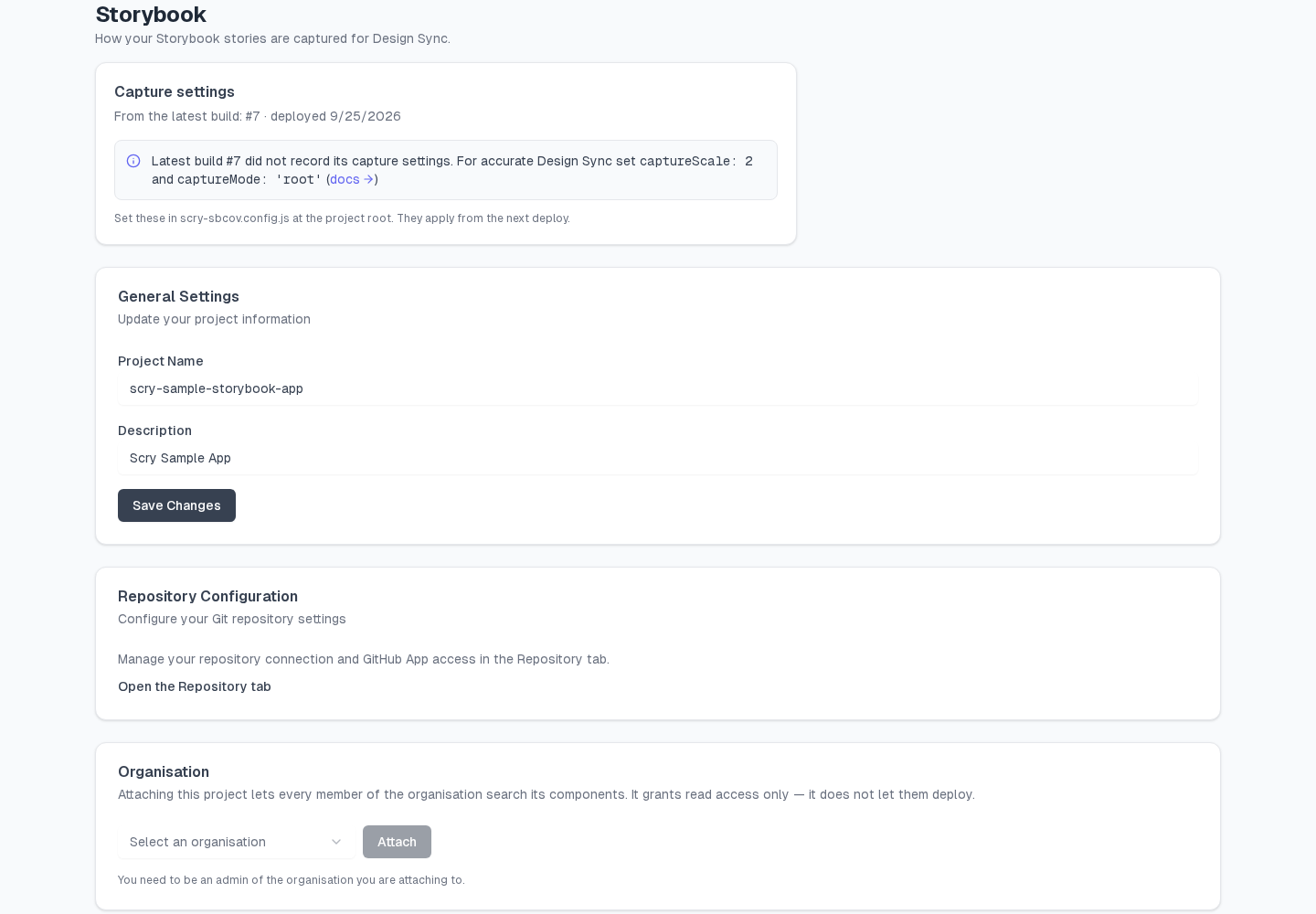
Then open a linked screen in Design Sync, run a diff, and read the Capture card: the Storybook column should show 2× and root, the size should match the Figma column, and the card should read No capture warnings. See What a Design Sync run records for every field on the card.
Every story in the build's metadata.json also records how it was taken, in a capture block:
"capture": {
  "mode": "root",
  "viewport": { "width": 1280, "height": 720 },
  "dpr": 2,
  "scale": 2,
  "target": "data-scry-root",
  "root_found": true,
  "box": { "x": 24, "y": 24, "width": 120, "height": 40 },
  "imageSize": { "width": 240, "height": 80 },
  "sbcov_version": "0.6.0"
}target says what was cropped (data-scry-root, storybook-root-child or viewport). root_found: false on a story you expected to be cropped means sbcov fell back to the whole viewport: add data-scry-root to that story's wrapper.